Post by
Have you ever applied for dozens of jobs only to receive little or no response? If so, your resume may not be reaching a recruiter at all. Before a Hiring Manager reviews your application, it often passes through an Applicant Tracking System (ATS)—software designed to organize, filter, and rank job applications. If your resume isn’t optimized for these systems, even a highly qualified candidate can be overlooked.
Today, more than ever, companies rely on Recruitment Software to streamline hiring. These platforms use Resume Parsing technology to extract information from resumes, identify relevant skills, compare qualifications against the job description, and determine whether an applicant should move to the next stage. This process, known as Applicant Profile Matching, plays a significant role in Recruiter Screening and Applicant Ranking.
Creating an ATS-Friendly Resume isn’t about tricking software. It’s about presenting your qualifications in a format that’s easy for both technology and people to understand. A well-optimized resume combines excellent content, proper formatting, strategic keyword placement, and measurable achievements that appeal to hiring teams.
In this guide, you’ll learn how to build a resume that improves ATS Compatibility, increases your Interview Callback Rate, and showcases your qualifications effectively. Whether you’re a recent graduate, changing careers, or an experienced professional, these best practices will help you create a resume that stands out for all the right reasons.
Why ATS Matters More Than Ever
The hiring process has evolved dramatically over the last decade. Instead of manually reviewing hundreds of resumes, employers now depend on sophisticated Applicant Tracking System (ATS) platforms to automate much of the screening process.
When you submit your application online, the ATS typically performs several tasks before a recruiter ever sees your resume:
- Reads your document using Resume Parsing
- Extracts your personal details and Contact Information
- Identifies your education and experience
- Detects important Resume Keywords
- Compares your qualifications with the job posting
- Calculates an internal Resume Score
- Supports Applicant Ranking for recruiters
If your resume is difficult for the software to interpret, your qualifications may never reach the hiring team—even if you’re an excellent fit.
Think of the ATS as a search engine. Just as search engines rely on keywords and structure to understand web pages, ATS platforms depend on clear formatting, relevant terminology, and organized content to evaluate resumes.
Understanding How an ATS Reads Your Resume
One of the biggest misconceptions is that ATS software reads resumes exactly as humans do. In reality, it processes documents differently.
The software scans the document, identifies headings, separates sections, and extracts information using Plain Text Parsing. This means visual design elements that look impressive to people can actually confuse the system.
An ATS generally searches for:
- Job titles
- Skills
- Certifications
- Education
- Employment history
- Dates
- Industry terminology
- Keywords from the job posting
If these details are buried inside graphics or decorative elements, the software may not recognize them.
For this reason, many resume experts recommend an ATS Resume Template designed specifically for automated screening. These templates prioritize readability and structured content over elaborate visuals.
Resume Parsing: What Actually Happens?
Imagine uploading your resume to a company’s careers page.
Within seconds, the ATS begins extracting information such as:
- Name
- Phone number
- Location
- Previous employers
- Job titles
- Employment dates
- Skills
- Degrees
- Professional Certifications
The system converts your document into structured data before comparing it with the employer’s requirements.
Poor formatting often results in incomplete or inaccurate parsing, reducing ATS Parsing Accuracy and lowering your chances of moving forward.
Build Your Resume Using ATS-Compliant Formatting
Your resume’s appearance matters—but not in the way many people think.
While colorful templates may look attractive, they can interfere with Resume Parsing. Instead, focus on ATS-Compliant Formatting that balances simplicity with professionalism.
Use a Single-Column Resume Layout
A Single-Column Resume Layout is the safest option because ATS software processes information from top to bottom.
Multi-column designs can cause sections to appear out of order, making your experience difficult for the software to interpret.
A simple layout also improves Resume Readability, helping recruiters quickly scan your qualifications after the ATS has approved your application.
Choose Standard Fonts
Always use Standard Fonts (Arial, Calibri, Times New Roman) or similarly readable fonts.
These fonts ensure compatibility across different ATS platforms and maintain a professional appearance.
Avoid decorative fonts because they may reduce readability or display incorrectly.
Stick to Standard Section Headings
Your headings should clearly identify each section.
Use Standard Section Headings such as:
- Contact Information
- Resume Summary
- Work Experience
- Education
- Skills
- Certifications
Avoid creative titles like:
- My Journey
- What I Bring
- Career Story
- Professional Adventures
ATS software recognizes conventional headings much more effectively.
Avoid Graphics and Complex Design Elements
Many candidates unknowingly hurt their applications by adding visual elements that ATS software cannot interpret correctly.
Practice Graphics and Icons Avoidance whenever possible.
Similarly, follow Tables and Text Boxes Avoidance because important information placed inside tables, text boxes, headers, or footers may not be extracted accurately during Plain Text Parsing.
Instead, rely on:
- Clean spacing
- Simple headings
- Standard bullet formatting
- Consistent typography
Use Bullet Points Effectively
Recruiters spend only a few seconds scanning each approved resume.
Using concise Bullet Points makes your accomplishments easier to read while helping ATS systems separate information correctly.
Good example:
- Increased organic website traffic by 72% in eight months.
- Reduced Google Ads cost per lead by 31%.
- Managed SEO campaigns for 25+ client websites.
Less effective example:
Responsible for marketing activities, campaign management, SEO, paid ads, reporting, and communication with clients.
Specific achievements are always stronger than vague responsibilities.
Optimize Every Resume Section for ATS Success
A resume isn’t just a list of jobs—it’s a strategic marketing document. Every section should support both ATS screening and recruiter decision-making.
Write a Strong Resume Summary
Your Resume Summary is one of the first sections both ATS software and recruiters evaluate.
Instead of generic statements, briefly highlight:
- Years of experience
- Industry expertise
- Core competencies
- Major accomplishments
- Career goals aligned with the role
For example:
Results-driven Digital Marketing Specialist with five years of experience in SEO, Google Ads, and content strategy. Successfully increased organic traffic by 150% across multiple client websites through data-driven optimization and strategic keyword planning.
This summary naturally includes relevant skills while remaining engaging and authentic.
Organize Your Work Experience Section
The Work Experience Section carries significant weight during ATS evaluation.
List positions using Reverse-Chronological Work Experience, beginning with your most recent role.
For each position include:
- Company name
- Job title
- Employment dates
- Key responsibilities
- Quantifiable achievements
Rather than listing daily tasks, demonstrate measurable impact.
For example:
- Improved website conversion rate by 24%.
- Managed $50,000 monthly advertising budget.
- Increased qualified leads by 41%.
These Quantifiable Achievements provide stronger evidence of your capabilities than generic descriptions.
Whenever possible, use the STAR Method to describe accomplishments:
- Situation
- Task
- Action
- Result
This framework helps transform ordinary responsibilities into compelling career achievements.
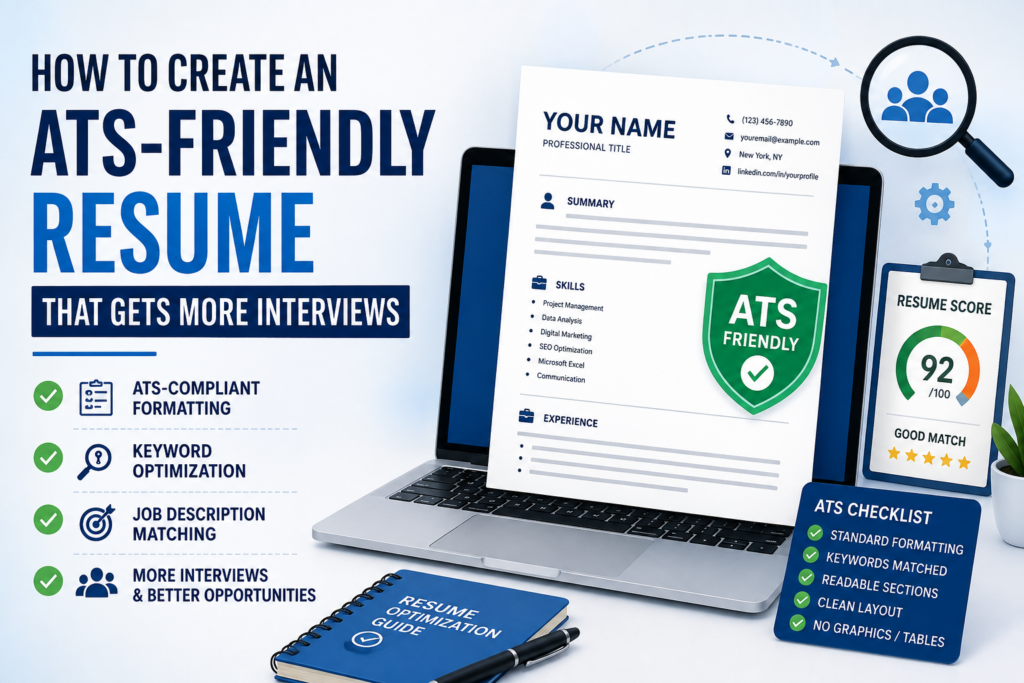
Master ATS Keywords and Resume Optimization
A beautifully formatted resume won’t get you very far if it doesn’t include the right keywords. Modern Applicant Tracking System (ATS) software is designed to compare your resume with the employer’s job posting. The closer the match, the greater your chances of passing the initial screening.
This doesn’t mean you should stuff your resume with keywords. Instead, focus on Resume Optimization by naturally incorporating relevant skills, qualifications, and industry terminology throughout your document.
Understand Job Description Matching
One of the most effective ways to improve your resume is through Job Description Matching. Before submitting your application, carefully review the job advertisement and identify recurring terms.
Pay attention to:
- Required skills
- Preferred qualifications
- Software and tools
- Industry certifications
- Technical competencies
- Job responsibilities
- Action-oriented language
For example, if a job description repeatedly mentions “SEO,” “Google Analytics,” “Content Strategy,” and “Technical SEO,” those exact phrases should appear naturally in your resume—provided you genuinely possess those skills.
This approach improves Keyword Alignment between your resume and the employer’s requirements, increasing the likelihood that the ATS recognizes you as a qualified candidate.
Use Resume Keywords Naturally
Effective Resume Keywords are specific terms that reflect your expertise and match the language employers use.
Examples include:
- Project Management
- Financial Analysis
- Customer Relationship Management
- Data Visualization
- Digital Marketing
- Search Engine Optimization
- Salesforce
- Python
- Microsoft Excel
- Adobe Photoshop
Avoid adding keywords simply because they appear in the job posting. Every keyword should accurately represent your experience.
Recruiters can quickly identify resumes that have been artificially optimized without supporting evidence.
Focus on ATS Keyword Optimization
ATS Keyword Optimization involves placing important keywords where they make the most impact.
Good locations include:
- Resume Summary
- Professional Experience
- Skills Section
- Education
- Certifications
- Project descriptions
Rather than repeating the same phrase multiple times, use related terminology where appropriate.
For example:
Instead of writing “Project Management” repeatedly, you might also include:
- Project Planning
- Stakeholder Management
- Team Leadership
- Agile Methodology
- Scrum Framework
This improves semantic relevance while keeping your writing natural and engaging.
Avoid Keyword Density Mistakes
Some applicants believe that repeating important phrases dozens of times will improve their ranking. In reality, excessive Keyword Density can make your resume difficult to read and may even raise concerns during recruiter review.
Aim for balance.
Every keyword should appear because it adds value—not because you’re trying to manipulate the system.
A well-written resume always prioritizes clarity over repetition.
Tailor Every Resume for Every Job
One of the biggest mistakes job seekers make is sending the same resume to every employer.
Instead, practice Resume Tailoring by customizing your resume for each position.
Although your overall work history remains the same, small adjustments can significantly improve ATS performance.
Tailoring may involve:
- Reordering skills
- Updating your Resume Summary
- Highlighting relevant projects
- Emphasizing industry-specific experience
- Including terminology from the job posting
For example, a marketing professional applying for an SEO role should emphasize:
- Technical SEO
- Content Strategy
- Google Search Console
- Keyword Research
- Analytics
The same candidate applying for a Paid Media role should instead prioritize:
- Google Ads
- Meta Ads
- Campaign Optimization
- Conversion Tracking
- Budget Management
This level of Resume Customization demonstrates relevance and improves both ATS rankings and recruiter interest.
Create a Job-Specific Resume
Rather than maintaining one generic resume, develop a Job-Specific Resume for each application.
Small changes can make a significant difference.
Consider modifying:
- Resume headline
- Resume Summary
- Skills order
- Project descriptions
- Keywords
- Achievements
This targeted approach signals that you’ve taken the time to understand the employer’s needs.
Build a Powerful Skills Section
The Skills Section serves two important purposes:
- It helps ATS software identify your qualifications.
- It allows recruiters to evaluate your expertise quickly.
An effective Skills Section should be organized, relevant, and easy to scan.
Highlight Hard Skills
Hard Skills are measurable, teachable abilities gained through education, training, or experience.
Examples include:
- SQL
- Python
- Microsoft Excel
- Google Analytics
- Adobe Photoshop
- AutoCAD
- Java
- Salesforce
- SEO
- Financial Modeling
Include only the skills that genuinely match your abilities and the job requirements.
Include Technical Skills
Many employers specifically search for Technical Skills during ATS screening.
These may include:
- Programming languages
- CRM software
- Marketing platforms
- Cloud technologies
- Accounting software
- Data analysis tools
- Design applications
If the position requires specialized software, mention your proficiency whenever appropriate.
Don’t Forget Soft Skills
While ATS systems primarily evaluate technical qualifications, recruiters also appreciate relevant Soft Skills.
Examples include:
- Communication
- Leadership
- Problem Solving
- Time Management
- Collaboration
- Adaptability
- Critical Thinking
Rather than simply listing these skills, demonstrate them through your achievements.
For example:
“Led a cross-functional team of eight employees to deliver a product launch two weeks ahead of schedule.”
This provides evidence of leadership instead of merely claiming it.
Showcase Transferable Skills
If you’re changing careers, your Transferable Skills become especially important.
These are abilities that apply across multiple industries, such as:
- Team Leadership
- Client Communication
- Project Coordination
- Data Analysis
- Research
- Presentation Skills
- Process Improvement
Recruiters value candidates who can apply proven skills in new environments.
Strengthen Your Education and Certifications
Although experience often carries the greatest weight, your educational background still contributes to ATS evaluation.
Optimize Your Education Section
Your Education Section should include:
- Degree
- Institution
- Graduation year (optional for experienced professionals)
- GPA (if strong and relevant)
- Honors
- Academic achievements
Keep the formatting clean and consistent.
Avoid unnecessary descriptions unless they strengthen your application.
Include Professional Certifications
Relevant Professional Certifications can significantly improve your resume’s competitiveness.
Examples include:
- Google Analytics Certification
- AWS Certified Cloud Practitioner
- PMP
- Certified ScrumMaster
- HubSpot Certification
- Cisco CCNA
- Microsoft Azure Fundamentals
Certifications demonstrate ongoing learning and may contain keywords employers actively search for.
Measure and Improve Your Resume
Before submitting your application, evaluate how well your resume performs.
Several online tools can help identify weaknesses and improve ATS compatibility.
Use an ATS Resume Checker
An ATS Resume Checker scans your resume and compares it with the target job description.
Typical feedback includes:
- Missing keywords
- Formatting issues
- Section improvements
- Skills gaps
- Readability recommendations
These insights can help refine your application before submission.
Review Your Resume Score
Many resume platforms calculate a Resume Score based on factors such as:
- ATS compliance
- Keyword relevance
- Formatting
- Completeness
- Content quality
- Readability
While no score guarantees success, it can highlight areas for improvement.
Test with a Resume Scanner
A Resume Scanner simulates how ATS software evaluates your resume.
Running your resume through one or more scanners allows you to:
- Verify keyword usage
- Detect formatting problems
- Improve parsing accuracy
- Increase compatibility with different recruitment platforms
Think of it as proofreading—but specifically for automated hiring systems.
Keep Your Resume Clear and Readable
Even after passing ATS screening, your resume still needs to impress a human recruiter.
Prioritize Resume Readability by using:
- Consistent formatting
- Clear headings
- Short paragraphs
- White space
- Concise bullet points
- Professional language
A recruiter should be able to understand your qualifications within 15–30 seconds.
Remember, ATS software opens the door—but your content convinces the hiring manager to schedule the interview.
Choose the Right Resume File Format
After spending hours crafting the perfect resume, don’t let the wrong file format reduce your chances of getting noticed. One of the most frequently asked questions from job seekers is whether to submit a PDF vs DOCX Resume.
The answer depends on the employer’s instructions.
- Use PDF when the job posting specifically accepts PDFs or doesn’t specify a format. A PDF preserves your formatting across different devices and operating systems.
- Use DOCX when the employer requests a Microsoft Word document or when you’re unsure whether the ATS supports PDFs. DOCX files are widely compatible with modern Recruitment Software and generally provide excellent ATS Parsing Accuracy.
Always follow the employer’s application instructions. Ignoring file format requirements can negatively impact your application before it’s even reviewed.
Follow Resume Formatting Best Practices
A professional resume should be attractive without sacrificing functionality. The goal is to make it easy for both ATS software and recruiters to understand your qualifications.
Follow these Resume Formatting Best Practices:
- Keep your resume to one page if you have less than five years of experience; two pages are acceptable for experienced professionals.
- Maintain consistent margins and spacing.
- Use font sizes between 10 and 12 points for body text and 14 to 16 points for headings.
- Use bold formatting sparingly to emphasize section titles or job titles.
- Align text consistently throughout the document.
- Avoid excessive colors and decorative elements.
Simple formatting enhances both ATS Compatibility and the experience of human readers.
Common ATS Resume Mistakes to Avoid
Even qualified candidates make mistakes that prevent their resumes from passing ATS screening. Avoid these common pitfalls:
1. Using Generic Resumes
Submitting the same resume for every application is one of the biggest reasons candidates are rejected. Every application should include thoughtful Resume Tailoring and Resume Customization based on the target role.
2. Ignoring the Job Description
Your resume should closely reflect the employer’s language without copying it word for word. Strong Job Description Matching demonstrates that your qualifications align with the position.
3. Stuffing Keywords
Adding excessive Resume Keywords without context may reduce readability and make your resume appear unnatural. Focus on meaningful ATS Keyword Optimization instead of increasing Keyword Density unnecessarily.
4. Using Complex Designs
Creative layouts may impress visually but often reduce ATS Parsing Accuracy. Continue practicing Tables and Text Boxes Avoidance and Graphics and Icons Avoidance to ensure the software can accurately process your information.
5. Listing Responsibilities Instead of Results
Recruiters care about outcomes. Replace vague responsibilities with Quantifiable Achievements that clearly demonstrate your impact.
For example:
Instead of:
- Responsible for managing social media.
Write:
- Increased Instagram engagement by 68% and generated over 450 qualified leads through targeted campaigns.
Real-World Example: Before and After ATS Optimization
Let’s compare two versions of the same work experience.
Before
Marketing Executive
- Managed SEO.
- Worked on Google Ads.
- Posted content on social media.
- Helped the marketing team.
While technically accurate, these statements don’t provide enough information to impress recruiters or ATS software.
After
Digital Marketing Executive
- Increased organic website traffic by 85% through SEO optimization and technical audits.
- Reduced Google Ads cost per acquisition by 28% through campaign restructuring.
- Developed a content strategy that generated 120,000 monthly organic impressions.
- Collaborated with cross-functional teams to improve lead generation by 35%.
- Applied the STAR Method to solve conversion bottlenecks, resulting in a 20% increase in sales-qualified leads.
The second version demonstrates measurable impact, incorporates relevant terminology, and showcases Career Achievements supported by data.
ATS-Friendly Resume Checklist
Before submitting your application, review this checklist:
✅ Used an ATS-Friendly Resume format.
✅ Selected an appropriate ATS Resume Template.
✅ Included accurate Contact Information.
✅ Wrote a compelling Resume Summary.
✅ Used Standard Section Headings.
✅ Organized employment using Reverse-Chronological Work Experience.
✅ Highlighted measurable Career Achievements.
✅ Added relevant Hard Skills, Soft Skills, and Technical Skills.
✅ Included valuable Transferable Skills where appropriate.
✅ Completed the Education Section with accurate details.
✅ Listed relevant Professional Certifications.
✅ Optimized Resume Keywords based on the job posting.
✅ Improved Keyword Alignment without keyword stuffing.
✅ Used concise Bullet Points.
✅ Followed ATS-Compliant Formatting.
✅ Chose Standard Fonts (Arial, Calibri, Times New Roman).
✅ Maintained a Single-Column Resume Layout.
✅ Practiced Graphics and Icons Avoidance.
✅ Followed Tables and Text Boxes Avoidance.
✅ Saved the correct PDF vs DOCX Resume format.
✅ Reviewed formatting using an ATS Resume Checker.
✅ Tested compatibility with a Resume Scanner.
✅ Evaluated and improved the Resume Score.
How an ATS-Friendly Resume Increases Your Interview Callback Rate
An optimized resume doesn’t guarantee a job offer, but it significantly improves your chances of getting noticed.
A well-structured resume helps by:
- Improving Resume Parsing results.
- Increasing ATS Compatibility across different hiring platforms.
- Enhancing Applicant Profile Matching with employer requirements.
- Supporting higher Applicant Ranking during automated screening.
- Making it easier for recruiters to identify your qualifications.
- Demonstrating professionalism and attention to detail.
When your resume reaches the Hiring Manager, the clear structure and relevant achievements make it easier to evaluate your suitability for the role. This combination of machine readability and human appeal can lead to a higher Interview Callback Rate.
Frequently Asked Questions
Can I use colors in an ATS-friendly resume?
Yes, but keep them minimal. Black text on a white background remains the safest choice. Excessive colors can distract recruiters, although most modern ATS platforms can process simple formatting.
Are graphics ever acceptable?
If you’re applying for a highly creative role and submitting a portfolio separately, graphics may have value. However, for the resume itself, it’s best to prioritize ATS compatibility by avoiding icons, charts, and decorative visuals.
How often should I update my resume?
Review your resume whenever you gain new experience, complete a certification, or apply for a different role. Regular updates ensure your achievements and skills remain current.
Should I include every job I’ve ever had?
Not necessarily. Focus on positions that are relevant to the role you’re applying for, emphasizing accomplishments that demonstrate your value.
Can AI help me create an ATS-friendly resume?
AI-powered resume tools can assist with formatting, keyword suggestions, and content improvement. However, always review the final version to ensure it accurately reflects your experience and sounds authentic.
Conclusion
Creating an ATS-friendly resume is no longer optional—it’s an essential step in today’s hiring process. By understanding how an Applicant Tracking System (ATS) works, organizing your resume with clean formatting, tailoring it to each opportunity, and highlighting measurable achievements, you position yourself for greater success.
Remember that an effective resume serves two audiences: automated recruitment systems and human decision-makers. Your goal is to make it easy for technology to recognize your qualifications while providing recruiters with compelling evidence of your skills, experience, and achievements.
Before sending your next application, take the time to:
- Customize your resume for the role.
- Match relevant keywords from the job description.
- Quantify your accomplishments.
- Test your resume with an ATS checker.
- Review the document for clarity and readability.
These small but meaningful improvements can increase your visibility during recruiter screening and help you secure more interview invitations.
Your resume is more than a document—it’s your professional marketing tool. Invest in it, keep it updated, and refine it for every opportunity. The extra effort today could be the reason you land your next interview tomorrow.
Also Read: Chronological vs Functional vs Combination Resume: Which Resume Format Is Best for Your Career?