
 Post by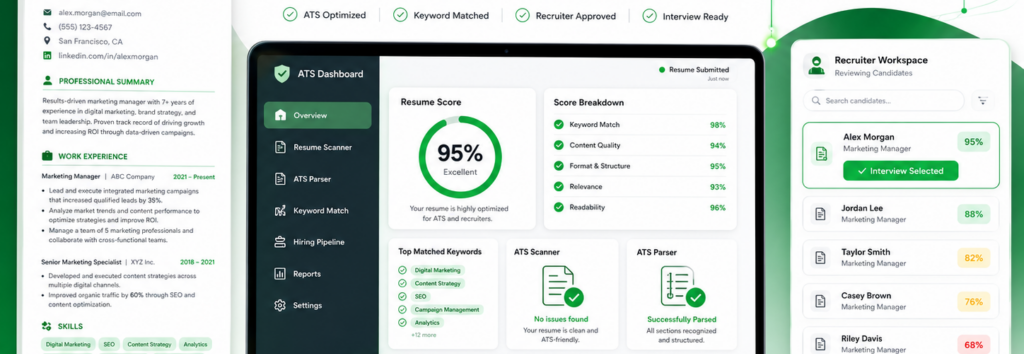
Learn how to create an ATS-friendly resume that passes Applicant Tracking Systems, improves resume score, and gets more interviews with expert tips.
Table of Contents
- What Is an ATS-Friendly Resume?
- Why Your Resume Gets Rejected Before a Human Reads It
- How Applicant Tracking Systems Actually Work
- Choosing the Right Resume Format
- Essential Resume Sections
- Resume Keywords and ATS Optimization
- Formatting Rules That Improve ATS Compatibility
- Resume Mistakes That Kill Interview Chances
- ATS Resume Checklist
- Frequently Asked Questions
How to Create an ATS-Friendly Resume That Gets Interviews
Landing your dream job is no longer just about impressing a recruiter. Before your resume reaches a Hiring Manager, it usually passes through an Applicant Tracking System (ATS)—software designed to automate Applicant Screening and identify the most qualified candidates.
Studies estimate that more than 90% of Fortune 500 companies and many mid-sized organizations rely on Recruitment Software to filter resumes before a recruiter ever reviews them. That means even a highly qualified candidate can be rejected if their resume isn’t optimized for ATS Compatibility.
The good news? Creating an ATS-Friendly Resume isn’t complicated once you understand how these systems work.
This comprehensive guide will teach you how to optimize every part of your resume—from Resume Keywords and formatting to Resume Tailoring, Job Description Keyword Matching, and improving your Resume Score.
Whether you’re a fresher, experienced professional, or changing careers, you’ll learn practical strategies that help your resume pass automated filters and increase your interview opportunities.
What Is an ATS-Friendly Resume?
An ATS-Friendly Resume is a resume specifically designed to be easily read, parsed, and ranked by an Applicant Tracking System.
Instead of evaluating resumes like humans, ATS software scans documents using a Resume Parser to extract important information such as:
- Contact Information
- Professional Summary
- Employment History
- Education Section
- Skills Section
- Relevant Certifications
- Technical Skills
- Soft Skills
After parsing the resume, the system compares your qualifications with the employer’s job requirements.
The closer your resume matches the job description, the higher your Resume Score.
Think of ATS as Google’s search engine—but instead of ranking websites, it ranks job applicants.
How Does Resume Parsing Work?
When you upload a PDF Resume or DOCX Resume, the ATS converts your document into structured data.
It identifies important Resume Sections by looking for Standard Section Headings, including:
- Professional Summary
- Work Experience
- Skills
- Education
- Certifications
If your resume contains unusual graphics, tables, text boxes, icons, or multi-column layouts, the parser may fail to understand your information correctly.
That’s why recruiters recommend using:
- Single-Column Resume Layout
- Clean Resume Formatting
- Standard fonts
- Proper spacing
- Clear headings
The easier your resume is to parse, the higher its ATS compatibility.
Why Most Resumes Never Reach a Recruiter
One of the biggest misconceptions among job seekers is believing that recruiters personally read every application.
In reality, companies may receive hundreds—or even thousands—of applications for a single role.
To save time, recruiters use Applicant Screening Software to eliminate resumes that don’t match required qualifications.
Common reasons ATS rejects resumes include:
Missing Resume Keywords
If your resume lacks the exact Industry-Specific Keywords mentioned in the job posting, the system assumes you’re less qualified.
For example:
Job Description
Looking for an SEO Specialist with Google Analytics, GA4, Keyword Research, Technical SEO, and Ahrefs experience.
Poor Resume
Responsible for digital marketing activities.
Optimized Resume
Managed Technical SEO, Keyword Research, Google Analytics 4 (GA4), Ahrefs, and Search Console to increase organic traffic by 120%.
Notice how the optimized version naturally includes the keywords recruiters are searching for.
Poor Resume Formatting
Many beautifully designed resumes fail because ATS software cannot interpret them correctly.
Avoid:
❌ Tables
❌ Text Boxes
❌ Icons
❌ Graphics
❌ Headers and Footers
❌ Multiple Columns
Instead, focus on:
- Plenty of White Space
- Consistent Bullet Points
- Clear headings
- Readable formatting
Simple resumes often outperform visually complex ones.
Wrong Resume Format
For most professionals, the Reverse Chronological Format is the best choice.
Why?
Recruiters want to see your most recent experience first.
This format is also preferred by almost every ATS platform because it presents information logically.
How Applicant Tracking Systems Rank Resumes
Understanding the ATS ranking process can dramatically improve your chances of getting shortlisted.
Most systems evaluate resumes using several factors.
1. Resume Keywords
Every job description contains essential Resume Keywords.
The ATS compares your resume against these terms.
Example:
Job Description
- SQL
- Power BI
- Tableau
- Python
Resume
SQL ✔
Power BI ✔
Python ✔
Excel ✔
Because your resume matches most required keywords, your ranking improves.
2. Job Description Keyword Matching
Never send the same resume to every company.
Instead, perform Job Description Keyword Matching.
Read the job description carefully and identify recurring phrases.
Examples include:
- Customer Relationship Management
- Project Management
- Business Intelligence
- Digital Marketing
- Cloud Computing
Then naturally incorporate those phrases into your resume where they accurately reflect your experience.
3. Core Competencies
Many ATS platforms prioritize a dedicated Core Competencies section.
Example:
Core Competencies
- Project Management
- Strategic Planning
- Team Leadership
- Budget Management
- Data Analysis
- Problem Solving
This helps ATS systems quickly recognize your strengths.
4. Skills Section
Your Skills Section should include a balanced mix of:
Technical Skills
Examples:
- Excel
- Python
- SQL
- AWS
- AutoCAD
- Figma
- Salesforce
Soft Skills
Examples:
- Leadership
- Communication
- Collaboration
- Adaptability
- Critical Thinking
- Time Management
Remember: only include skills you genuinely possess and can discuss during an interview.
5. Accomplishment Statements
Recruiters love measurable results.
Instead of writing:
Managed social media accounts.
Write:
Increased Instagram engagement by 145% within six months through content optimization and audience analysis.
These Accomplishment Statements showcase Quantifiable Achievements and Metrics-Driven Achievements, making your resume stronger for both ATS and recruiters.
Expert Tip: Write for Humans First, Then Optimize for ATS
One of the biggest mistakes candidates make is stuffing their resumes with keywords.
ATS software has become much smarter over the years.
Today’s systems don’t just count keywords—they evaluate context and relevance.
Your goal is to create an Interview-Ready Resume that balances:
- ATS optimization
- Recruiter readability
- Professional storytelling
- Clear accomplishments
- Relevant experience
A resume that ranks highly but reads poorly won’t impress a recruiter. Likewise, a beautifully written resume that an ATS can’t parse may never be seen.
The most effective resumes satisfy both.
Building an ATS-Optimized Resume That Recruiters Want to Read
In Part 1, you learned how an Applicant Tracking System (ATS) scans resumes, why many applications are rejected before reaching a recruiter, and how ATS software evaluates candidates.
Now it’s time to optimize the sections that have the biggest impact on your Resume Score and interview success.
In this part, we’ll cover:
- Writing a compelling Professional Summary
- Structuring the Work Experience Section
- Creating an ATS-friendly Skills Section
- Choosing powerful Action Verbs
- Resume customization for every job application
- PDF vs DOCX: Which format should you use?
- Resume formatting best practices
How to Write a Professional Summary That Passes ATS
Your Professional Summary is one of the first sections both recruiters and ATS software analyze.
Think of it as your elevator pitch. In just three to five sentences, explain who you are, what you specialize in, and the value you bring.
An effective summary naturally incorporates your target Job Title, years of experience, key Technical Skills, relevant Soft Skills, and important Industry-Specific Keywords.
ATS-Friendly Example
Digital Marketing Specialist with 6+ years of experience driving organic growth through SEO, content marketing, Google Analytics, and paid advertising. Successfully increased website traffic by 180% and generated qualified leads through data-driven marketing strategies. Skilled in keyword research, technical SEO, campaign optimization, and cross-functional collaboration.
This summary works because it includes:
- Target Job Title
- Years of experience
- Industry keywords
- Technical expertise
- Quantifiable achievements
- Recruiter-friendly language
Build a Powerful Work Experience Section
The Work Experience Section carries the most weight in ATS ranking.
Recruiters spend only a few seconds scanning employment history, so clarity is essential.
Use the following structure:
Job Title
Company Name
Location
Employment Dates
Achievement-based bullet points
Example
SEO Specialist
ABC Technologies
January 2022 – Present
- Increased organic traffic by 145% through technical SEO improvements.
- Improved keyword rankings for over 250 commercial keywords.
- Reduced bounce rate by 38% through content optimization.
- Led a team of five marketing professionals.
- Increased lead generation by 62%.
Notice that every bullet contains measurable impact.
Turn Responsibilities into Quantifiable Achievements
Recruiters don’t want to know what you were responsible for.
They want evidence that you delivered results.
Instead of writing:
❌ Managed social media accounts.
Write:
✅ Increased Instagram engagement by 210% within 10 months through audience research and content optimization.
Instead of:
❌ Worked on SEO.
Write:
✅ Improved website visibility from 18,000 to 72,000 monthly visitors through technical SEO and content strategy.
These Quantifiable Achievements demonstrate real business impact and strengthen ATS relevance.
Use Strong Action Verbs
Every bullet point should begin with an Action Verb.
Avoid weak phrases like:
- Responsible for
- Worked on
- Helped with
- Assisted
Instead, use verbs that show ownership and impact.
High-Impact Action Verbs
Leadership
- Led
- Directed
- Managed
- Mentored
- Coordinated
Growth
- Increased
- Improved
- Optimized
- Accelerated
- Expanded
Operations
- Developed
- Implemented
- Built
- Designed
- Executed
Marketing
- Generated
- Ranked
- Converted
- Launched
- Promoted
Analytics
- Measured
- Evaluated
- Forecasted
- Analyzed
- Reported
Action verbs improve readability and make accomplishments stand out to both ATS software and recruiters.
Create an ATS-Friendly Skills Section
A dedicated Skills Section is critical because ATS software often scans it separately.
Organize it into categories.
Technical Skills
- Microsoft Excel
- SQL
- Python
- AWS
- Tableau
- Power BI
- Google Analytics
- Adobe Photoshop
- Salesforce
- HubSpot
Soft Skills
- Leadership
- Communication
- Collaboration
- Time Management
- Critical Thinking
- Adaptability
- Problem Solving
- Teamwork
Core Competencies
- Project Management
- Business Analysis
- Customer Relationship Management
- Data Analysis
- Strategic Planning
- Digital Marketing
- Process Improvement
- Stakeholder Management
This structure improves ATS parsing and recruiter readability.
Include Relevant Certifications
Adding a Certifications section helps strengthen credibility and keyword relevance.
Examples:
- Google Analytics Certification
- AWS Certified Solutions Architect
- Microsoft Azure Fundamentals
- PMP Certification
- Scrum Master Certification
- HubSpot Inbound Marketing
- Meta Certified Digital Marketing Associate
- Cisco CCNA
Always include certifications that match the job requirements.
Resume Customization: Never Send the Same Resume Twice
One of the biggest mistakes job seekers make is sending one generic resume to every employer.
Instead, perform Resume Tailoring for every application.
Step 1
Read the job description carefully.
Highlight:
- Skills
- Software
- Responsibilities
- Certifications
- Experience
Step 2
Identify recurring Resume Keywords.
Example
Job Description
Python
SQL
AWS
Leadership
Project Management
Resume
Python ✔
SQL ✔
AWS ✔
Leadership ✔
Project Management ✔
The closer your resume aligns with the employer’s language, the higher your ATS compatibility.
Keyword Optimization Without Keyword Stuffing
Many applicants think repeating keywords dozens of times will improve rankings.
It won’t.
Modern ATS systems understand context.
Instead:
✔ Include keywords naturally.
✔ Match terminology used in the job description.
✔ Add keywords where they genuinely reflect your experience.
Focus on Keyword Optimization, not keyword stuffing.
PDF vs DOCX: Which Resume Format Is Better?
A common question is whether to upload a PDF Resume or DOCX Resume.
PDF Resume
Advantages
- Preserves formatting
- Looks professional
- Works well with modern ATS systems
Disadvantages
- Some older ATS platforms struggle with PDFs
DOCX Resume
Advantages
- Highest compatibility
- Easier for ATS parsing
- Preferred by older recruitment software
Disadvantages
- Formatting may change across devices
Best Practice
If the employer specifies a format, follow those instructions.
Otherwise:
- Use DOCX if compatibility is your priority.
- Use PDF when formatting and visual consistency are more important and the ATS supports PDF uploads.
Clean Resume Formatting Best Practices
ATS software favors simplicity.
Follow these formatting rules:
✔ Use a Single-Column Resume Layout
✔ Standard fonts (Calibri, Arial, Helvetica)
✔ Font size 10–12 pt
✔ Bold section headings
✔ Plenty of White Space
✔ Consistent Bullet Points
✔ Standard section names
Avoid:
- Tables
- Text boxes
- Icons
- Graphics
- Images
- Headers and footers
- Multiple columns
- Decorative fonts
Simple formatting improves Resume Parsing and recruiter readability.
ATS-Friendly Resume Structure
Arrange your resume in this order:
- Contact Information
- Professional Summary
- Core Competencies
- Work Experience
- Skills Section
- Education
- Certifications
This structure follows ATS best practices and makes it easier for recruiters to find key information quickly.
Expert Tip: Think Like a Recruiter
Before submitting your resume, ask yourself:
- Does my resume clearly show my value in the first 10 seconds?
- Have I included the most relevant keywords from the job description?
- Are my achievements measurable?
- Is the formatting clean and ATS-compatible?
- Would a recruiter instantly understand my experience?
If the answer is “yes” to all of these, you’re far more likely to pass ATS screening and secure interviews.
Key Takeaways from Part 2
- Craft a concise Professional Summary that includes your target role, experience, and core strengths.
- Focus your Work Experience Section on Quantifiable Achievements instead of listing responsibilities.
- Use strong Action Verbs to communicate ownership and impact.
- Build a categorized Skills Section with Technical Skills, Soft Skills, and Core Competencies.
- Tailor your resume for every application using Resume Tailoring and Job Description Keyword Matching.
- Choose PDF or DOCX based on employer requirements and ATS compatibility.
- Keep formatting simple with a Single-Column Resume Layout, standard headings, bullet points, and ample white space.
Congratulations! If you’ve followed Parts 1 and 2, you now understand how an Applicant Tracking System (ATS) evaluates resumes, how to optimize each section, and how to tailor your application for different roles.
This final part focuses on the finishing touches that can dramatically improve your chances of getting shortlisted. We’ll cover the most common ATS mistakes, a practical checklist, useful tools, frequently asked questions, and final optimization tips.
Top 15 ATS Resume Mistakes That Get Candidates Rejected
Even experienced professionals make simple mistakes that reduce their Resume Score and prevent recruiters from seeing their applications.
1. Using Tables and Text Boxes
Many ATS platforms struggle to interpret tables and text boxes, causing important information to be skipped.
Instead: Use a simple single-column layout with plain text.
2. Missing Job Description Keywords
Submitting the same resume to every employer is one of the biggest reasons applicants fail ATS screening.
Solution: Tailor your resume to include relevant keywords from each job description.
3. Using Creative Section Titles
Avoid headings like:
- My Journey
- Career Story
- My Expertise
Use standard headings such as:
- Professional Summary
- Work Experience
- Skills
- Education
- Certifications
4. Keyword Stuffing
Adding the same keyword repeatedly doesn’t improve ATS performance.
Example:
SEO SEO SEO SEO SEO SEO
Instead, naturally incorporate keywords within your accomplishments and skills.
5. Listing Responsibilities Instead of Results
Recruiters care about measurable outcomes.
❌ Managed sales team.
✅ Increased regional sales by 45% in one year.
6. Poor Contact Information
Always include:
- Full Name
- Phone Number
- Professional Email
- LinkedIn Profile
- Portfolio (if relevant)
7. Using Fancy Fonts
Choose ATS-friendly fonts like:
- Calibri
- Arial
- Helvetica
- Verdana
Avoid decorative fonts that may not parse correctly.
8. Multiple Columns
Two-column resumes may look attractive but often confuse ATS software.
Stick to a Single-Column Resume Layout.
9. Including Graphics or Icons
Photos, charts, rating bars, icons, and infographics can interfere with resume parsing.
Keep your resume text-based.
10. Generic Professional Summary
Your summary should be tailored to the role and include relevant keywords.
11. Missing Quantifiable Achievements
Use numbers whenever possible:
- Increased revenue by 30%
- Reduced costs by 18%
- Managed a team of 12
- Improved customer satisfaction by 25%
12. Ignoring Technical Skills
Include tools, software, programming languages, and platforms relevant to your profession.
13. Not Including Certifications
Certifications often match ATS keywords and strengthen your application.
14. Saving in the Wrong Format
Always follow the employer’s instructions.
When no format is specified:
- DOCX offers broad compatibility.
- PDF preserves formatting if supported.
15. Not Proofreading
Typos, inconsistent formatting, and grammar mistakes can hurt both ATS parsing and recruiter confidence.
The Ultimate ATS Resume Checklist
Use this checklist before every job application.
| Checklist Item | Complete |
|---|---|
| Single-column layout | ✅ |
| Standard section headings | ✅ |
| Contact information included | ✅ |
| Professional summary customized | ✅ |
| Resume keywords added naturally | ✅ |
| Work experience with measurable achievements | ✅ |
| Technical skills listed | ✅ |
| Soft skills included | ✅ |
| Relevant certifications added | ✅ |
| Reverse chronological format | ✅ |
| Bullet points used consistently | ✅ |
| Clean formatting with white space | ✅ |
| No tables, icons, or graphics | ✅ |
| Saved as PDF or DOCX (per employer instructions) | ✅ |
| Proofread for grammar and spelling | ✅ |
Best ATS Resume Checker & Resume Scanner Tools
Before submitting your resume, run it through an ATS checker to identify missing keywords and formatting issues.
Free Tools
- Resume Worded
- Jobscan (limited free scans)
- Resume.io ATS Checker
- Enhancv Resume Checker
- Kickresume Resume Checker
Premium Tools
- Teal Resume Builder
- Jobscan Premium
- Rezi AI
- TopResume
- SkillSyncer
These tools can help you evaluate keyword matching, ATS compatibility, and overall resume quality.
ATS Optimization Tips for Different Job Roles
Software Developers
Include technologies such as:
- Python
- Java
- JavaScript
- SQL
- AWS
- Docker
- Kubernetes
- Git
Digital Marketing Professionals
Focus on:
- SEO
- Google Ads
- GA4
- Meta Ads
- Email Marketing
- Ahrefs
- SEMrush
- Content Strategy
Data Analysts
Highlight:
- SQL
- Python
- Power BI
- Tableau
- Excel
- Data Visualization
- ETL
- Machine Learning (if applicable)
HR Professionals
Include:
- Recruitment
- HRIS
- Employee Relations
- Payroll
- Talent Acquisition
- Performance Management
Project Managers
Emphasize:
- Agile
- Scrum
- Jira
- Stakeholder Management
- Budget Planning
- Risk Management
- PMP Certification
FAQ
1. What is an ATS-friendly resume?
An ATS-friendly resume is designed to be easily read by Applicant Tracking Systems, using clean formatting, standard headings, and relevant keywords.
2. What resume format is best for ATS?
The reverse chronological format with a single-column layout is generally the most ATS-compatible.
3. Should I use PDF or DOCX?
Follow the employer’s instructions. If none are provided, DOCX offers broad compatibility, while PDF preserves formatting on modern ATS platforms.
4. Can ATS read graphics and icons?
Many ATS platforms cannot reliably parse graphics, icons, text boxes, or charts.
5. How many keywords should I include?
Include only keywords that accurately describe your skills and experience. Focus on natural integration rather than repetition.
6. Should I tailor my resume for every job?
Yes. Resume tailoring significantly improves ATS matching and increases your chances of being shortlisted.
7. How long should my resume be?
- Freshers: 1 page
- Professionals with experience: 1–2 pages
- Senior executives: Up to 2 pages, depending on experience
8. Does ATS reject resumes automatically?
ATS typically ranks and filters resumes based on relevance. Recruiters often review the highest-ranked applications first.
9. What are the most important resume sections?
- Contact Information
- Professional Summary
- Work Experience
- Skills
- Education
- Certifications
10. How often should I update my resume?
Update it whenever you gain new skills, certifications, projects, or achievements—or before applying for a new role.
An ATS-friendly resume isn’t about gaming software—it’s about presenting your qualifications in a clear, structured, and relevant way. By combining clean formatting, targeted keywords, measurable achievements, and thoughtful customization, you make it easier for both ATS software and recruiters to understand your value.
Treat every job application as unique. Read the job description carefully, tailor your resume, and emphasize the experience that best matches the employer’s needs. Small improvements—such as replacing vague responsibilities with measurable achievements or adding role-specific keywords—can make a significant difference in your interview rate.
Remember that your resume is often your first impression. Investing the time to optimize it can open doors to better opportunities.
Quick Action Plan
- Read the job description thoroughly.
- Identify the most important keywords and required skills.
- Update your Professional Summary to match the target role.
- Add measurable achievements to your Work Experience section.
- Organize Technical Skills, Soft Skills, and Certifications.
- Use a clean, single-column layout with standard headings.
- Proofread carefully for grammar, spelling, and consistency.
- Check ATS compatibility with a resume scanner.
- Save in the required format (PDF or DOCX).
- Submit with confidence.
Conclusion
Creating an ATS-friendly resume is one of the most effective ways to improve your job search results. A well-optimized resume increases your visibility in applicant tracking systems, communicates your value clearly to recruiters, and helps you stand out in a competitive hiring process.
By applying the strategies from this three-part guide, you’ll be able to create a professional, interview-ready resume that balances ATS optimization with excellent readability. Keep refining your resume as your career grows, tailor it for each opportunity, and let your accomplishments—not just your responsibilities—tell your professional story.